
Scary Hot Dogs Guide: Night Shift Survival and Orders
A practical Scary Hot Dogs guide: open the stand, build every order, read dangerous customers, survive power cuts, and reach the ending routes.
Scary Hot Dogs looks like a cooking game until the wrong customer leans into the window. The stand loop is simple, but the shift has teeth: orders expire, the power fails, and some visitors are not customers at all. This guide is the front door to the whole site. If you only read one page before your first shift, read this one, then keep the Scary Hot Dogs wiki→ open for platform and release facts.
The game is out now on PS5 with PS VR2 required, and on Meta Quest. The Steam page is live but still says To be announced. That split matters because most launch footage comes from Quest and PS VR2, and the mobile Android build is a different, flatter version. The survival logic below is based on those public builds and the official store copy, not on a local install.
Quick answer
Open the stand, cook the sausage before you touch the bun, hand over the order, and check the cameras before you relax. If a customer feels wrong, close the hatch. Money is only useful if you spend it on protection before the night that needs it.

The shift loop, in order
Every night follows the same skeleton. Flip the main power switch, open the kiosk door, step inside, and raise the serving gate. The first customer arrives once the window is open. From there the job is a queue: take the request, cook the sausage on the grill, put it in a bun, add the requested condiment, and hand it over. Payment lands after the handoff, not when you start cooking.
Two mistakes cost more than they should. First, serving an undercooked sausage. Launch footage shows the sausage needs grill time before it goes into the bun, and a raw dog can go wrong. Second, building the hot dog before reading the whole ticket. Customers often add a drink or a side, and a missing item can turn a paying visit into a complaint. The full menu is on the all orders page→, and the step-by-step build order is in the recipes guide→.
The stand is small on purpose. The grill, condiments, coffee machine, security monitor, fire extinguisher, mop, torch, and rear delivery hatch are all within a few steps. Learn that layout before you learn the horror events. Panic makes you walk into the counter; routine makes you fast.
The first night is a tutorial with a knife
Night one is where the game teaches the job. You get normal orders, a little banter, and just enough odd behaviour to make you check the window twice. Do not spend the whole shift staring at the monitor. The monitor is a tool, not a television. Check it between orders, then get back to the grill.
The useful first-night habits are:
- Charge the torch before the lights start to flicker.
- Serve the order in front of you before you investigate a noise.
- Keep the serving gate closed when nobody is at the window.
- Learn which button closes the hatch before you need it.
- Count your cash after the shift, not during it.
The night one walkthrough→ turns that into a minute-by-minute opening plan.
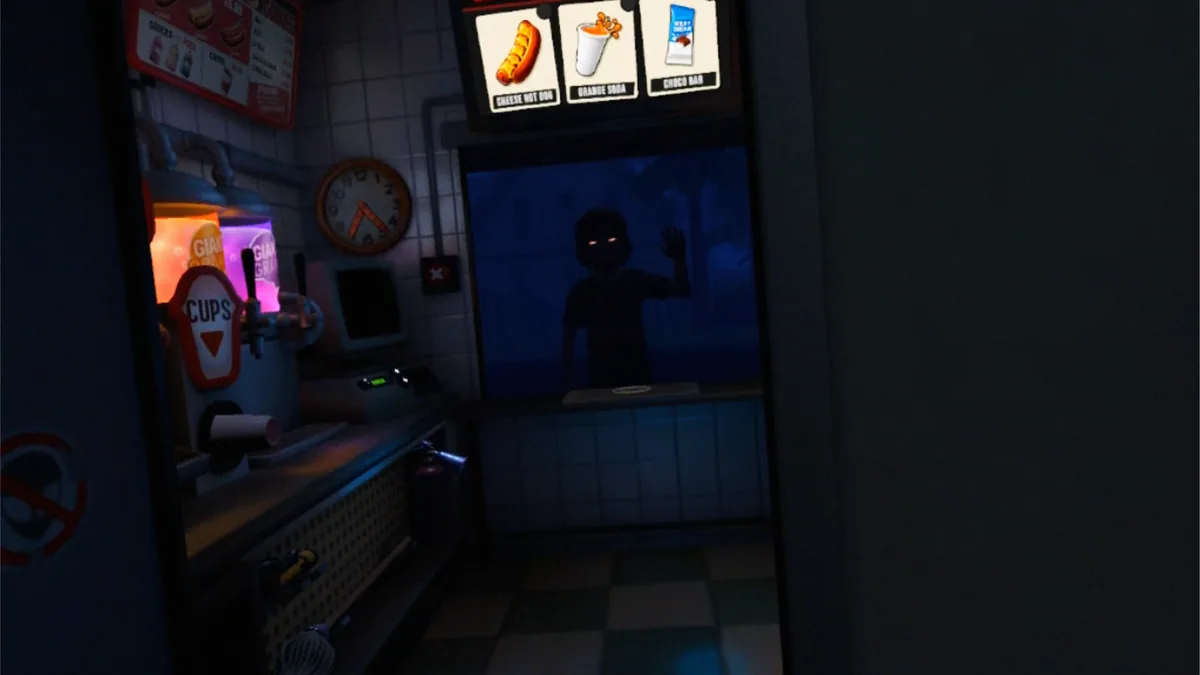
Customers are the real difficulty curve
The horror is not a random jump-scare generator. It is the customer queue. Some people are ordinary, tired, and hungry. Some stare too long. Some argue. Some change shape. A few arrive with a weapon of their own. The safe read is not "human equals good" or "mask equals bad"; it is whether the visitor follows the customer script.
A customer who orders, waits, pays, and leaves is a customer. A visitor who leans through the window, never orders, or keeps standing there after the shift timer moves is a problem. The customers guide→ breaks down the tells, and the monsters page→ covers the creatures that clearly are not people.
The skip button is your first weapon. It closes the hatch and ends the interaction without a fight. The big red button by the window closes the shutters. Neither is a permanent solution, but both buy time. Time lets you check the camera, grab the taser, or decide that this order is not worth the money.
Power cuts and the yellow corridor
The power cut is the signature set piece. The lights die, the stand goes dark, and the space outside the serving window turns into a long yellow corridor that looks like a backrooms joke with worse lighting. The fix is not to explore it. The fix is to find the main power switch and flip it back.
That sounds easy until you are in the dark with a torch that needs charging. Charge the torch early. Keep the path to the power switch clear. Tell yourself before the cut happens which way you will turn. The power outage guide→ has the full routine, including what to do when the cut happens mid-order.
The yellow corridor is a reset space, not a loot route. Public footage shows the power switch restoring the stand. Wandering deeper costs shift time and puts you away from the counter when a customer arrives.
Spend money before the bad night
Cash from orders buys protection from the shop: a frying pan, a taser, a sleeping spray, and a gun. The gun is the most expensive item in the footage, and it is not the first thing a new player should buy. A taser or spray gives you a non-lethal answer earlier, and the pan is cheap enough to own before the first serious threat.
Treat the shop as insurance, not a collection. Buy one tool that covers the range you lack. If you keep getting caught at the window, buy the close-range option. If you keep getting chased after the shutters fail, buy time. The weapons guide→ compares the tools without pretending there is a single meta pick.
Money also controls pacing. A shift where you serve every order funds the next shift's protection. A shift where you hide in the back with the shutters down does not. The money guide→ covers the order-first routine.
Endings are routes, not a single boss
The store copy promises a mystery, and reviewers confirm multiple endings. The developer has not published an official ending count or a step-by-step route list. That means any page claiming "the three endings" with exact triggers is guessing. What we can say is that the ending changes based on how you handle customers, how much of the stand's story you uncover, and whether you keep the business running long enough to see it through.
Do not rush the ending on your first night. Learn the menu, learn the tells, and let the events accumulate. The endings guide→ explains what is confirmed, what is still unknown, and which choices are worth testing on a second run.
Which version should you play?
If you own a PS VR2, the PS5 version is the cleanest console route: $13.99, released November 20, 2026, and explicitly marked PS VR2 Required. If you own a Quest 2, 3, 3S, or Pro, the Meta version launched earlier on October 23, 2026 at $14.99 and has the most public ratings. If you are waiting for Steam, the page is live but the release date is still To be announced, and the PC build is VR Only.
The PS VR2 page→ covers the headset requirement, the Steam page→ tracks the TBA status, and the price comparison→ puts every store in one table.
FAQ
Is there a non-VR way to play Scary Hot Dogs?
Not on PS5 or Steam. The PS5 listing says PS VR2 Required, and the Steam listing is marked VR Only. The Android mobile version is playable on a flat screen with touch controls, but it is a separate build with ads and in-app purchases.
Can I play Scary Hot Dogs without PS VR2?
No. The PS5 product page lists PS VR2 as required, not optional. A standard DualSense and a television are not enough for that version.
How long is one shift?
Public footage shows a clock in the stand and short, repeatable shifts rather than a long open-ended day. The full game is roughly one to two hours for a first completion, with multiple endings adding replay time. The runtime page→ has the details.
Does the game have jumpscares?
Yes. The official copy advertises jumpscares and unexpected events, and the content descriptors mention frightening characters, monsters, disturbing appearances, and tense situations. There is no advertised gore or sexual content.
Official source: Scary Hot Dogs on Steam ↗ and PlayStation Store product PPSA40470 ↗ Community source: VR Cricket Guy launch breakdown ↗ and Game Critix review ↗ Inference source: the opening routine and spending priorities are editorial recommendations drawn from public launch footage, not developer instructions.